
You are in. Three small things to do this week, none longer than a few minutes. You are not expected to contribute anything yet.
Step 1: Say hello
-
Open the Codetopia Community server. On a computer, click its icon on the far left. On a phone, tap it in the strip on the left of the channel list.
-
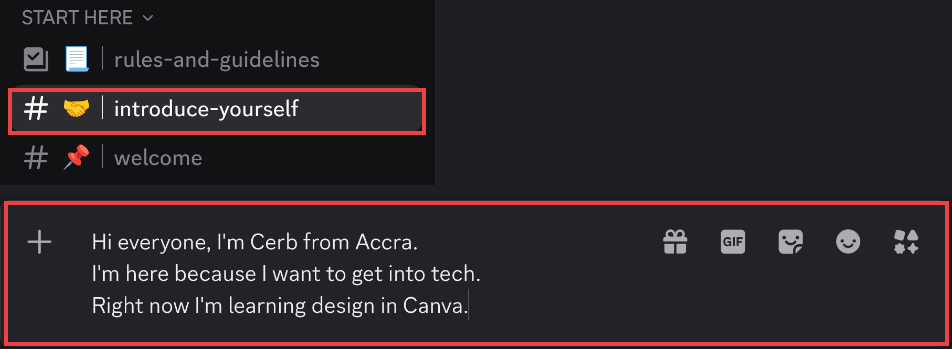
Under START HERE, click or tap introduce-yourself.
-
Click or tap the message box at the bottom of the screen.
-
Copy this, paste it, and fill in the blanks (replace each
___with your own words). On a phone, press and hold the text to copy it. On a computer, click the copy icon at the top right of the box.plaintextHi everyone, I'm ___ from ___. I'm here because ___. Right now I'm learning ___. -
Send it. On a computer, press Enter. On a phone, tap the send button to the right of the box.
TIP
Need a new line without sending? On a computer, hold Shift and press Enter. On a phone, press return.
Step 2: Know five channels
Channels are grouped under headings in the channel list. Scroll the list to find them.
| Channel | Under the heading | Use it for |
|---|---|---|
| channel rules-and-guidelines | START HERE | How we treat each other. |
| channel introduce-yourself | START HERE | Saying hello. Once. |
| channel general | COMMUNITY | Chat, and sharing what you are working on. |
| channel get-involved | COMMUNITY | Where teams post what they need help with. |
| channel ask-for-help | LEVEL UP | Questions, and asking for help when stuck. |
Two more worth knowing:
- channel announcements (under ANNOUNCEMENTS): news, upcoming events, the monthly thank-you recap, and new jobs. You only read it.
- channel wins-and-milestones (under COMMUNITY): got your first job, shipped a project, passed an exam? Share it here. Everyone celebrates with you, and big wins are shared in the monthly recap. Share a win shows how.
Ignore every other channel until you are curious.
NOTE
channel ask-for-help and channel get-involved are forums: each question is its own post with a title. The Using Discord shows how to make a post and reply to one.
Step 3: Reply to one person
- Go back to introduce-yourself.
- Find someone who posted recently.
- On a computer, move your mouse over their message and click Reply, the curved arrow that appears. On a phone, press and hold the message, then tap Reply.
- Write one or two sentences. "Welcome, I'm new too" is enough. Send.

You are done when
- Your hello is in channel introduce-yourself
- You have replied to one person
If you get stuck, ask in channel ask-for-help. Say what you tried and what happened.
What's next?
Come to an event. Going to an event shows how. Every meetup and session is on the events page, and you can add them to your calendar.
When you feel like helping, there are four easy ways in.